Semantic search vs keyword search: what's the difference for e-commerce?
Keyword search and semantic search both return product results, but they decide what counts as a match in completely different ways. One matches the characters a shopper typed; the other matches what they meant. For an online store, that gap is the difference between a sale and an empty results page.
The short answer. Keyword search matches the exact words a shopper types against your product text, with optional typo tolerance and a synonyms list you maintain. Semantic search converts products and queries into vectors — numbers that represent meaning — and matches by similarity, so it returns the right product even when the words don't overlap. For e-commerce the practical test is simple: keyword search asks “do these words appear?” while semantic search asks “do these mean the same thing?” — which is why a search for “something to keep my coffee hot” finds your travel mug under one and returns nothing under the other.
If you run a store, you don't need the academic version of this. You need to know which one stops shoppers from hitting empty results, what each costs you, and when the older approach is still the right call. So that's how I'll frame it: two ways of deciding what counts as a match, and what that means for a real catalog.
What is keyword search?
Keyword search is the one you already know. It takes the shopper's text, looks for those words across your product titles, descriptions, and sometimes attributes, and returns what contains them. WooCommerce's built-in search is the basic form of this — a database LIKE query against product titles and content. Dedicated keyword plugins add real improvements on top: a fast autocomplete dropdown, fuzzy matching that forgives typos, and a synonyms table where you tell the engine that “trainers” also means “sneakers.”
It's fast, predictable, and easy to reason about. The limitation is structural: it can only match words it has, in some form. If the shopper's phrasing isn't in your product text and you haven't added it as a synonym, the result is empty. The synonyms list is you, by hand, trying to anticipate every way a person might describe what you sell.
What is semantic search?
Semantic search matches on meaning instead of characters. When you index your store, every product runs through an embedding model that outputs a vector — in FindAstra's case a list of 384 numbers that captures what the product is about. The shopper's query goes through the same model and gets its own vector. The engine then ranks products by how close their vectors are, using cosine similarity. Products that mean similar things sit close together, even when they share no words.
That's the whole idea. “Comfortable hiking shoes” lands near “Trail Running Sneakers Cushioned” because the model learned at training time that those phrases are related. No synonym entry, no guessing. Here's it working on a descriptive query that has zero matching keywords in the catalog:
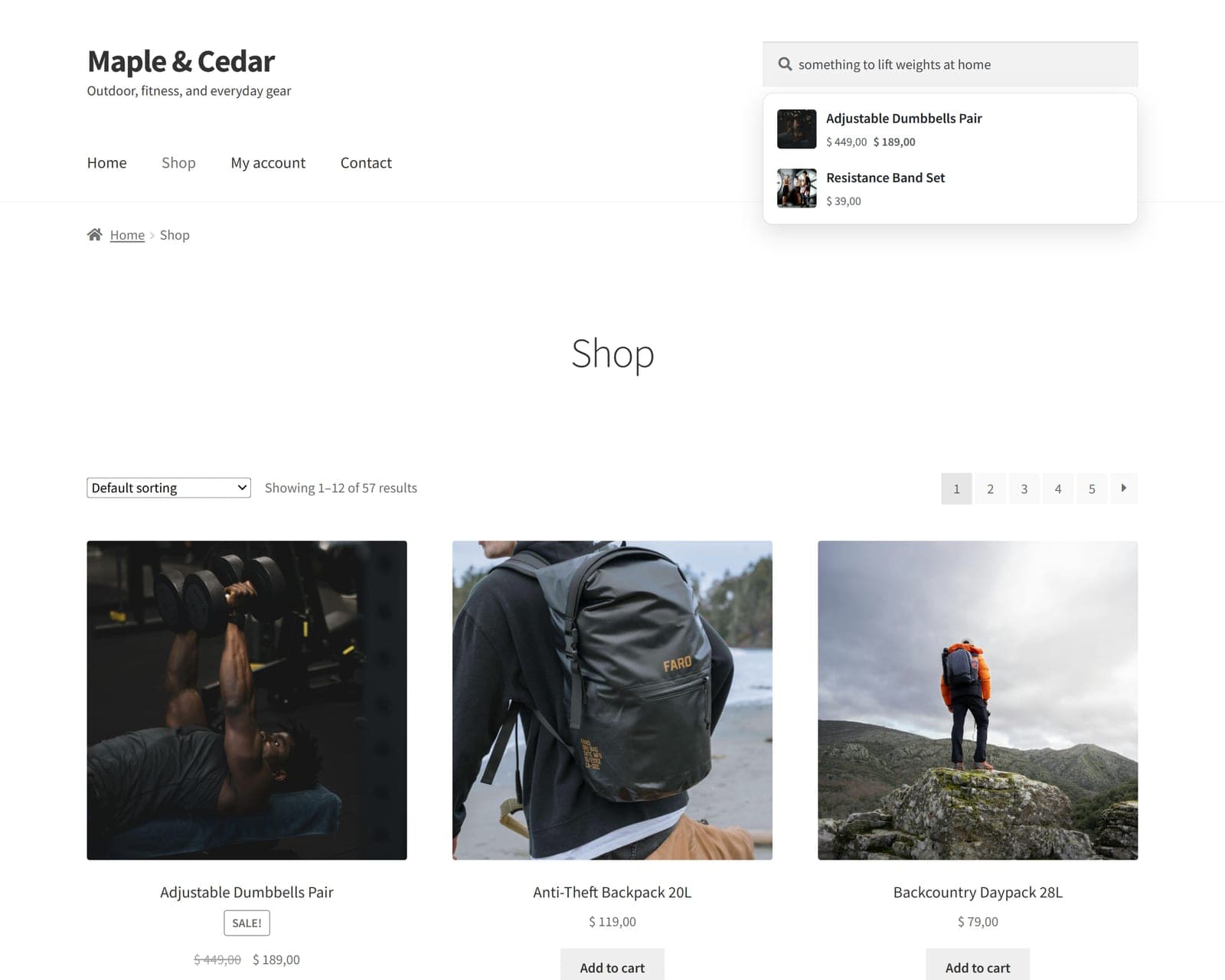
“Something to lift weights at home” shares no words with the product titles, yet semantic search surfaces the dumbbells and resistance bands.
If you want the mechanics in more depth — embeddings, cosine similarity, the whole pipeline — I wrote a longer explainer on how AI semantic search works.
Semantic search vs keyword search: the core difference
The cleanest way to see it is to run the same kinds of queries through both and watch where they diverge. Same catalog, five common cases:
| The shopper types… | Keyword search | Semantic search |
|---|---|---|
| Exact product name or SKU | Strong match | Strong match |
| A typo (“snekers”) | Misses, unless fuzzy matching is on | Often still matches by meaning |
| A synonym (“couch” for “sofa”) | Misses, unless you added the synonym | Matches — learned they’re related |
| A description (“keep my coffee hot”) | Usually misses | Matches the travel mug |
| A phrasing you never anticipated | Misses | Handles it |
Notice the top row: for an exact product name, both do fine. The divergence shows up the moment a shopper stops naming the product and starts describing it. That's not a rare edge case in retail — it's how a lot of people search when they don't know your exact catalog wording.
Why does the difference matter for e-commerce?
Because the people using your search box are the ones most likely to buy. They've skipped the menus and told you, in their own words, exactly what they want. When the search fails them, you don't just lose a pageview, you lose a shopper who was ready.
And descriptive searching is common. Baymard Institute's usability research found that 61% of e-commerce sites can't handle the way people actually search when they describe what they want instead of typing the exact product name (Baymard, “The Current State of E-Commerce Search”). On a keyword-only store, every one of those descriptive queries is a coin flip between a sale and an empty page. I went deep on that failure mode in why WooCommerce search returns “No products found”.
When is keyword search good enough?
Often, honestly. If your shoppers mostly type exact product names, model numbers, or SKUs — common in electronics, auto parts, and B2B — keyword search with good typo tolerance does the job, and the meaning layer would be solving a problem you don't have. Keyword search is also easier to predict and debug, which some teams value.
The fastest way to know which camp you're in is to read your own search log. If the queries look like product names, keyword search has you covered. If they read like sentences a person would say out loud, you're leaving sales on the table without meaning-based matching. For a head-to-head on the two approaches in real plugins, see FiboSearch vs FindAstra.
Do you have to choose? (hybrid search)
No. The two approaches combine well, and on a big catalog combining them is the smart default. FindAstra uses hybrid retrieval above about 5,000 products: a MySQL FULLTEXT keyword prefilter narrows the field to the most relevant candidates, then semantic similarity re-ranks those by meaning. You get keyword speed and semantic relevance in a single query, and the whole thing adds roughly 20–30 milliseconds.
So the real question isn't “keyword or semantic.” It's whether your search understands meaning at all. If it doesn't, the descriptive queries your highest-intent shoppers type are quietly failing. If you want to add the meaning layer without a SaaS subscription, FindAstra's Local engine does it for $0 — see the pricing for the paid tiers, or read the four-step setup guide to try it on your own catalog.
Frequently asked questions
Keyword search matches the literal words a shopper types against your product text, with optional typo tolerance and manual synonyms. Semantic search converts products and queries into vectors — numbers that represent meaning — and matches by similarity, so it finds the right product even when no words overlap. Keyword search asks 'do these words appear?'; semantic search asks 'do these mean the same thing?'
Not universally. Semantic search wins when shoppers describe what they want ('warm jacket for rainy hikes', 'gift for someone who loves cooking') or use synonyms the catalog doesn't contain. Keyword search is excellent — and sometimes better — when shoppers type exact product names, model numbers, or SKUs. Many stores get the best result from a hybrid: keyword first to narrow, semantic to re-rank by meaning.
Not necessarily. Some semantic search relies on cloud APIs, but it doesn't have to. FindAstra's default Local engine runs the embedding model in the shopper's browser using transformers.js — no API key, no account, $0 forever. Optional server-side engines (Hugging Face's free tier, OpenAI for about $2/year) are available in FindAstra Pro if you want them.
It's a list of numbers that captures the meaning of a piece of text. An embedding model reads a product title or a search query and outputs a fixed-length list (FindAstra uses 384 numbers). Texts that mean similar things get similar lists, so you can measure how related two things are by comparing their numbers. That comparison is what makes meaning-based matching possible.
Yes, and on large catalogs it's the smart default. FindAstra uses hybrid retrieval above about 5,000 products: a MySQL FULLTEXT keyword prefilter narrows candidates, then semantic similarity re-ranks them. You get keyword speed and semantic relevance in one pass.