FiboSearch vs FindAstra: keyword search vs true semantic search for WooCommerce
Both plugins replace WooCommerce's weak default search, but they solve different halves of the problem. FiboSearch makes keyword search fast and forgiving; FindAstra changes what "a match" means. This is the honest side-by-side, including where FiboSearch is the better pick.
The short answer. FiboSearch and FindAstra both replace WooCommerce's weak default search, but they work differently. FiboSearch is a keyword search plugin: it matches the words a shopper types, with typo tolerance and a synonyms list you maintain. FindAstra is a semantic search plugin: it matches by meaning, so a search for “something to lift weights at home” surfaces your dumbbells even though they share no words. Choose FiboSearch for fast, familiar keyword autocomplete and best-in-class typo handling. Choose FindAstra when shoppers describe what they want instead of naming it, and when you'd rather pay once than subscribe.
I want to be straight about this up front: FiboSearch is good software. It's one of the most installed search plugins on WooCommerce for a reason, the autocomplete dropdown is genuinely fast, and the free version alone beats the stock search box. So this isn't a teardown. It's a comparison of two tools that look similar in a feature list and behave very differently the moment a shopper types something the merchandiser didn't anticipate.
The whole comparison comes down to one question: when a search and a product don't share the same words, what happens? That's where keyword search and semantic search part ways, and it's the thing a spec sheet hides.
What's the actual difference between FiboSearch and FindAstra?
FiboSearch is built on a keyword engine. It takes the shopper's text, looks for those words (and close misspellings of them) across your product titles, descriptions, SKUs, categories, and attributes, and ranks what it finds. To bridge the gap when wording doesn't match, it gives you two tools: fuzzy matching, which tolerates typos using edit distance, and a synonyms table, where you tell it that “couch” and “sofa” mean the same thing. Both are manual safety nets bolted onto keyword matching, and both work well within their limits.
FindAstra doesn't match words at all. At index time it converts every product into a vector — a list of numbers that captures meaning — and it does the same to each search the moment a shopper types it. Then it ranks products by how close their meaning is to the query. “Comfortable hiking shoes” lands near “Trail Running Sneakers Cushioned” because the model learned those phrases are related, not because they share a word. If you want the mechanics without the jargon, I wrote that up separately in how AI semantic search works.
FiboSearch vs FindAstra: the comparison table
Here's the honest side-by-side. I've marked where FiboSearch wins, where FindAstra wins, and where it's a genuine tie. FiboSearch pricing is from their site at the time of writing and is billed annually; FindAstra's is one-time.
| FindAstra | FiboSearch | |
|---|---|---|
| Pricing model | Free plan + $89 one-time Pro | Free, or Pro from $59/yr |
| Matches by meaning | Yes — vector embeddings | No — keyword based |
| Typo / fuzzy tolerance | Partial (prefix + semantic) | Yes — 3 fuzzy modes |
| Live autocomplete dropdown | Yes | Yes |
| Works without an API key | Yes — Local tier | Yes |
| Runs on the shopper's device | Yes — Local engine | No — server-side |
| Theme integration | Auto-attaches, no theme code | Auto, plus shortcode / widget |
| Zero-result (catalog-gap) analytics | Built in (Pro) | Via no-result logging |
| Self-hostable | Yes | Yes |
| Encrypted credential storage | Yes — for OpenAI / HF keys | N/A — no external API |
FiboSearch tiers: free version, then Personal $59/yr (1 site), Entrepreneur $99/yr (3 sites), Agency $249/yr (25 sites). FindAstra: a free version on WordPress.org, then Pro $89 (1 site), Agency $199 (5 sites), Unlimited $399 — each paid once.
How does FiboSearch search?
FiboSearch runs an inverted-index keyword engine, the same broad approach a traditional search library uses, tuned for WooCommerce. It's quick even on large catalogs, and the Pro version adds an engine the FiboSearch team says runs roughly 10× faster than the free one. Three features do the heavy lifting:
- Fuzzy matching. If a shopper types “iphome” it still finds “iPhone” by allowing a couple of character edits. You can set it to soft, normal, or hard. This is the part FindAstra doesn't do as well, and I'll say so plainly below.
- Synonyms. You build a list so “trainers” also matches “sneakers.” It's effective, but it's a list you have to keep writing as you discover new phrasings.
- Field coverage. Pro searches custom fields, attributes, tags, brands, and SKUs for variations, so you can match on structured data, not just the title.
The honest limitation is the one baked into keyword search: it can only match words it has, in some form. If the words aren't in your product text and you haven't added them as a synonym, the query comes back empty. The synonyms list is you, manually, trying to predict every way a human might phrase a request. That works until it doesn't scale.
How does FindAstra search?
FindAstra skips the prediction problem. Because it compares meaning, it handles phrasings you never thought to add. Here's a real one from a test store. A shopper typed “something to lift weights at home.” None of those words are in the product titles. Default WooCommerce returns nothing. FindAstra returns the dumbbells and the resistance bands in the live dropdown, before the shopper even hits enter.
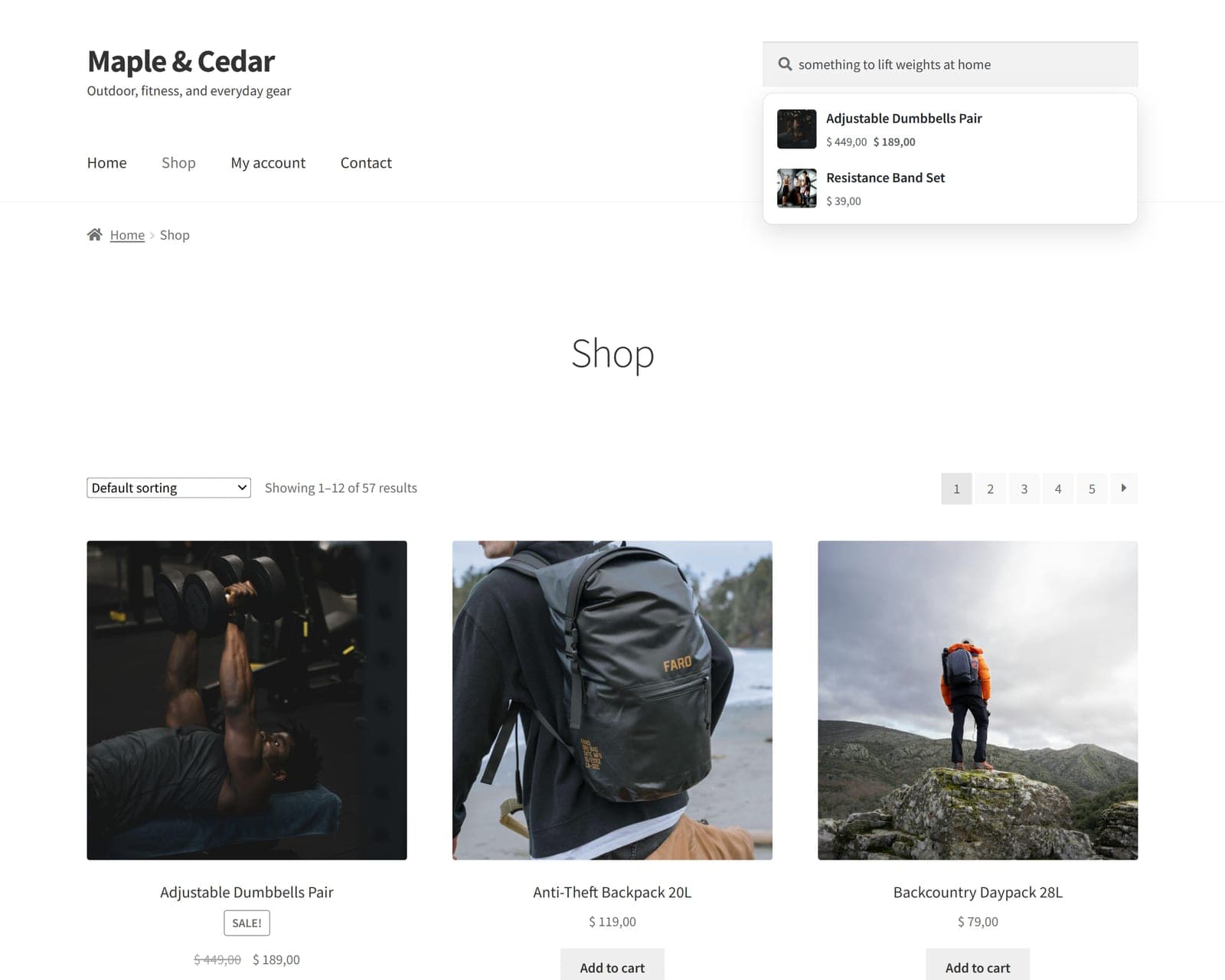
FindAstra's autocomplete for “something to lift weights at home” — a query with zero matching keywords — surfaces the dumbbells and resistance bands by meaning.
The same thing happens on the full results page. Below, a search for “Nike” on a store that carries no Nike-branded products. Default search gives the dead-end page on the left. FindAstra reads the intent (athletic footwear and sportswear) and returns the closest things the store actually sells.
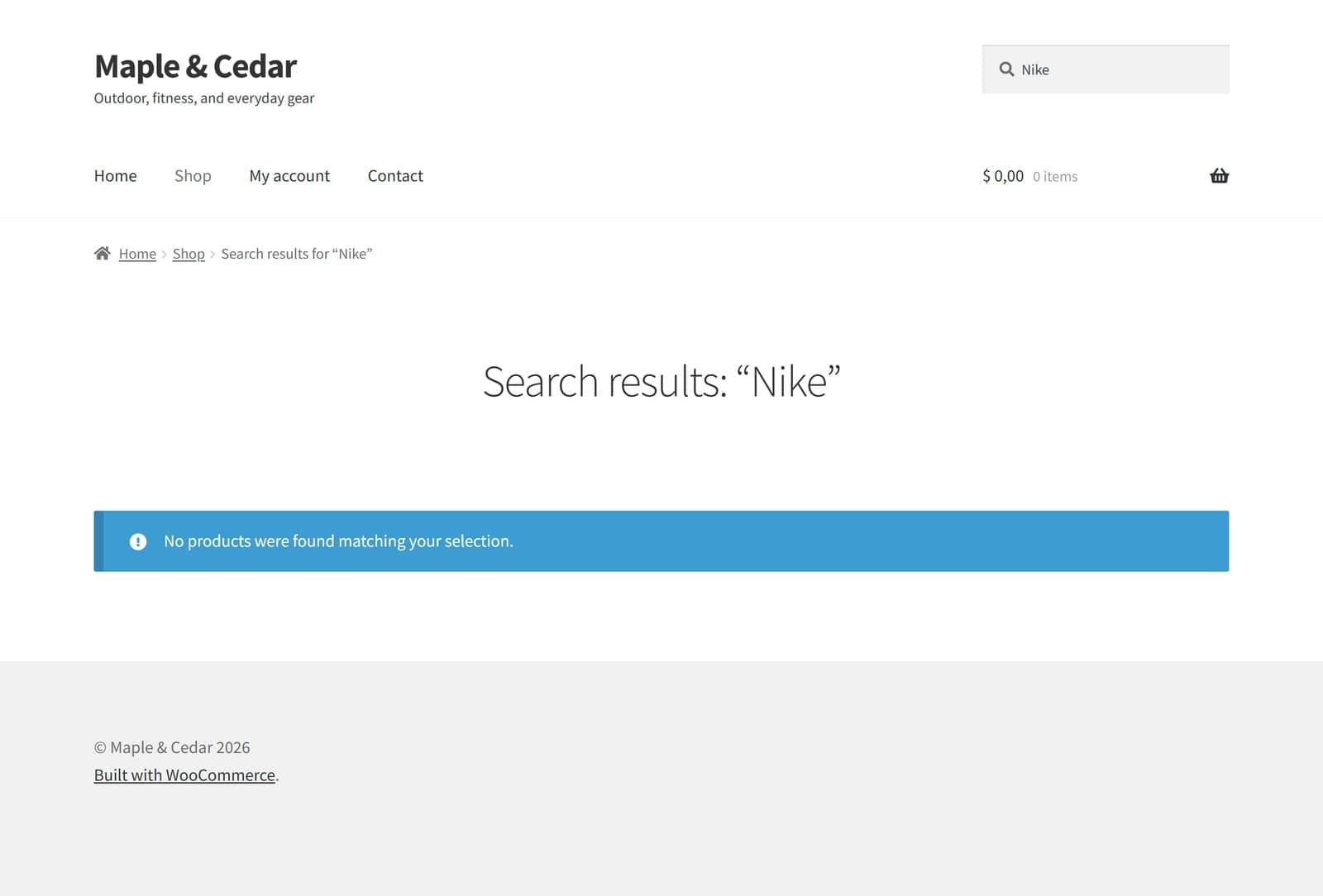
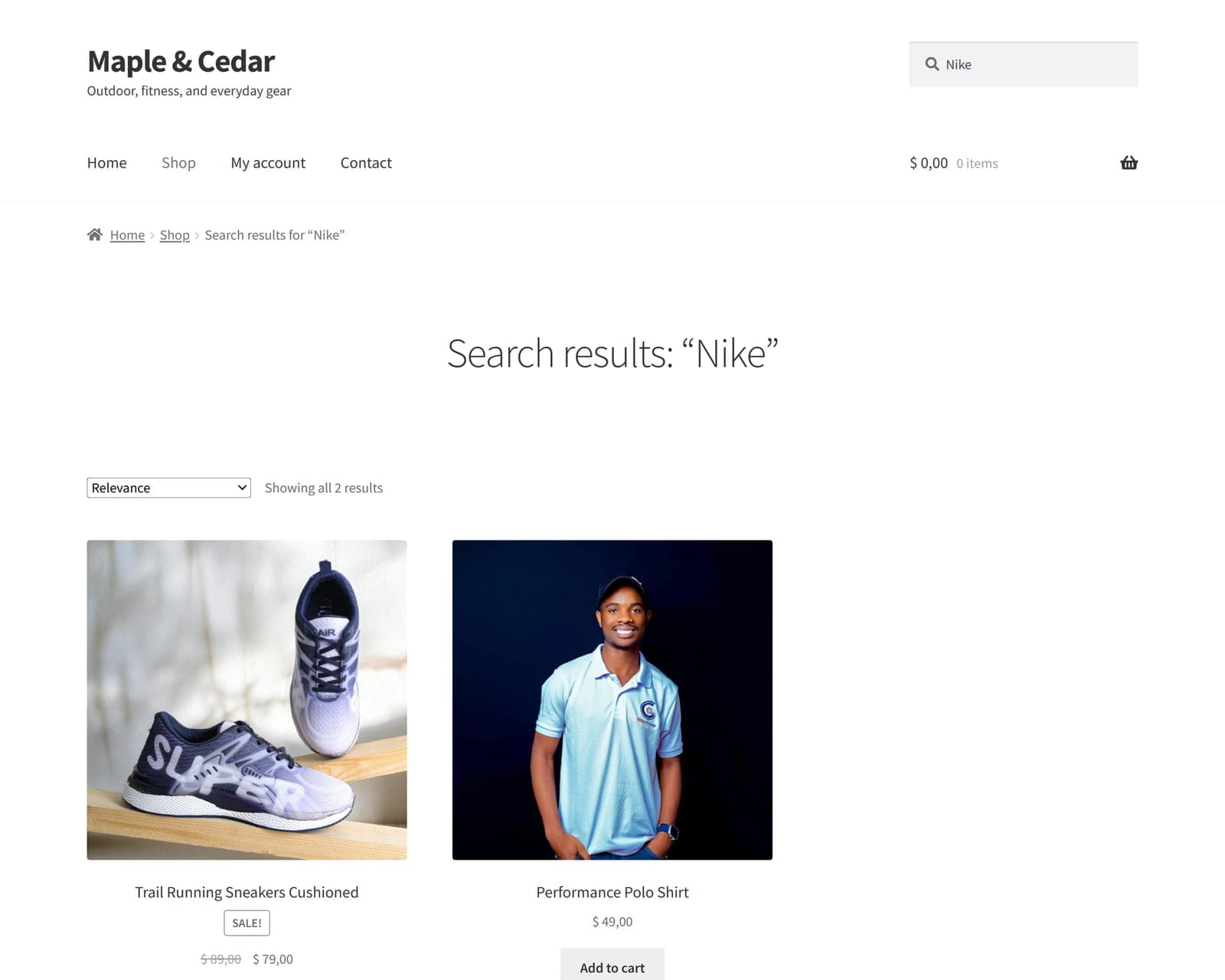
Where FindAstra is weaker than FiboSearch is raw typo handling. If a shopper mangles a brand name into something the model can't recognise, semantic matching has less to work with than a dedicated fuzzy algorithm. FindAstra leans on a prefix index plus meaning to cover most of it, but if your traffic is heavy on misspelled exact product names, FiboSearch's fuzzy modes have the edge. Credit where it's due.
When is FiboSearch the better choice?
Plenty of the time, honestly. Reach for FiboSearch if:
- Your shoppers mostly search by exact product name, model number, or SKU — electronics, auto parts, and B2B catalogs often do.
- Typo tolerance is your top priority. Its fuzzy matching is more deliberate than anything meaning-based, and you can dial it in.
- You want a mature, widely-used free tier with a polished autocomplete dropdown, and keyword matching covers what your shoppers need. (FindAstra has a free version too, but FiboSearch's is the more battle-tested of the two.)
- You like maintaining a synonyms list and have the time to curate it as your catalog grows.
None of that is a backhanded compliment. For a store whose shoppers type precise queries, a fast keyword engine with good typo handling is the right tool, and adding semantic ranking on top would be solving a problem you don't have.
When does FindAstra win?
FindAstra pulls ahead when shoppers describe rather than name. Think “warm jacket for rainy hikes,” “gift for someone who loves cooking,” or “something to lift weights at home.” These are the queries keyword search misses unless you've pre-loaded every phrasing as a synonym, and they're common on fashion, home, gifting, outdoor, and general-merchandise stores.
There's a second thing I'd point to: FindAstra Pro shows you the queries you're losing. Its Analytics tab logs every search and flags the ones that returned nothing under Catalog gaps — real shopper demand you either don't stock or can't surface yet. It's privacy-safe, with no IPs or user agents recorded.
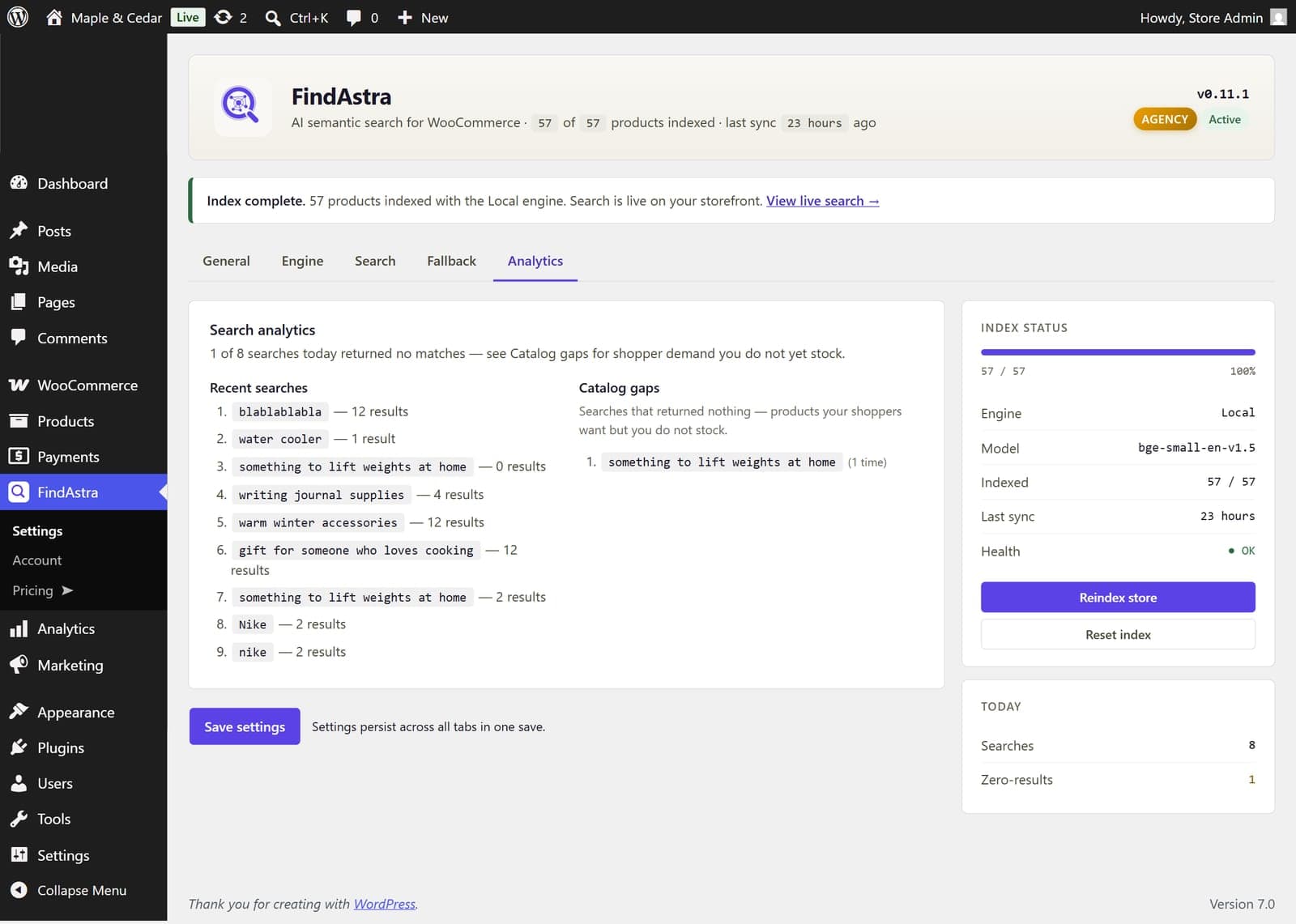
The Analytics tab (FindAstra Pro). “Catalog gaps” are the searches that returned nothing — the exact phrases costing you sales.
FiboSearch supports the same workflow in spirit: its docs recommend reviewing no-result searches and adding them as synonyms. The difference is who does the work. With FiboSearch that list is a chore you maintain forever. With FindAstra the gap report is a stock-and-merchandising signal, because the matching itself already handles the phrasing.
Pricing: one-time vs annual subscription
This is the other real difference, and it's about billing model, not just the number. Both plugins have a free version on WordPress.org, so you can start either one without paying a cent. Where they split is the paid tier. FiboSearch Pro is a yearly subscription: $59/yr for one site, $99/yr for three, $249/yr for twenty-five at current pricing, with a renewal discount. FindAstra's paid Pro is bought once: $89 for one site, $199 for five, $399 for unlimited, with lifetime updates and a 30-day money-back guarantee.
In year one, a single FiboSearch Pro site ($59) is cheaper than FindAstra ($89). By year two the one-time purchase is already ahead, and it keeps widening. Neither is “the cheap one” in the abstract; it depends on whether you'd rather spread the cost or close it out. If recurring software fatigue is real for you, the one-time model is the point. You can see the full FindAstra pricing for what each tier includes.
One more cost note people miss: FindAstra's default engine runs in the shopper's browser, so there's no API bill at all. If you opt into a server-side engine later, Hugging Face's free tier covers roughly 30,000 searches a month, and OpenAI runs about $2 a year for an average store. There's no tier where semantic search forces a monthly invoice on you.
So which one should you choose?
If your shoppers type exact names and your priority is fast autocomplete with strong typo tolerance, FiboSearch is a safe, well-supported pick, and the free version is a genuine upgrade over stock search. If your shoppers describe what they want, if you keep finding empty result pages for products you actually stock, or if you'd rather buy once than renew every year, that's the FindAstra case.
The fastest way to decide isn't a feature list, it's your own search log. Pull the last fifty searches on your store and read them. If they're mostly product names and SKUs, keyword search has you covered. If they read like sentences a person would say out loud, you want meaning-based matching — and the next read for you is why WooCommerce search returns “No products found”, which walks through diagnosing exactly that.
Frequently asked questions
It overlaps but it isn't a clone. FiboSearch is a keyword search plugin with a fast autocomplete dropdown, fuzzy typo tolerance, and manual synonyms. FindAstra is a semantic search plugin that matches products by meaning using vector embeddings. If your shoppers mostly type exact product names or SKUs, FiboSearch is excellent. If they describe what they want in their own words, FindAstra finds matches FiboSearch can't.
No, and it doesn't claim to. FiboSearch matches keywords, with fuzzy matching for typos (Levenshtein edit distance) and a synonyms table you maintain by hand. That works well when the words line up. It returns nothing for a query like "something to lift weights at home" unless those words appear in the product or you added them as synonyms. FindAstra matches that query to dumbbells and resistance bands because it compares meaning, not characters.
Both have a free version on WordPress.org, so you can start either one for nothing. On paid tiers it depends on the timeframe: FiboSearch Pro is billed annually (Personal $59/yr, Entrepreneur $99/yr, Agency $249/yr at the time of writing), while FindAstra's Pro is a one-time purchase ($89 for 1 site, $199 for 5, $399 unlimited). Over three years a single FiboSearch Pro site costs more than FindAstra's one-time $89; in year one they're close.
Technically yes, but you usually shouldn't point both at the same search box — they'd compete to rank the same results. Pick the model that fits how your shoppers search. If you love FiboSearch's dropdown but want meaning-based ranking on the results page, FindAstra's auto-attach handles both the dropdown and the results page on its own.
No to both. FindAstra's default Local engine runs the embedding model in the shopper's browser — no API key, no account, $0 forever. Optional server-side engines (Hugging Face's free tier, or OpenAI for about $2/year) are available in FindAstra Pro if you want them. There is no subscription; you buy the plugin once.